

SQL SERVER Log shipping:
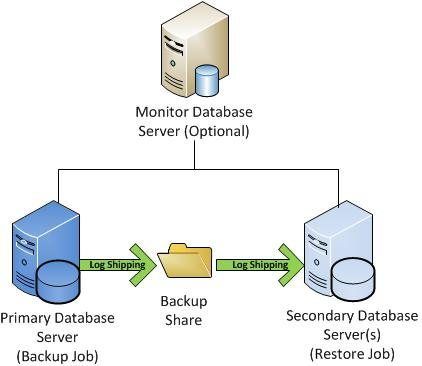
Log shipping:
Shipping the transnational log backups from one server (Primary) to another server (Secondary)
SQL Server Log shipping allows you to automatically send transaction log backups from a primary database on a primary server instance to one or more secondary databases on separate secondary server instances. The transaction log backups are applied to each of the secondary databases individually.
What are the Pre-Requisites to configure the log shipping?
1. 2 server are mandatory or if 3 servers is good
2. SQL Server agent should up & running
3. network drive to be share [Will required to share to access both primary and secondary servers].
4. Recovery model should be full or bulk-logged in primary and secondary databases
5. Read and write permissions on backuup share and minimum read permissions on copy
6. Edition support logshipping are enterprise, standard ,workgroup, developer edition
7. User should be a part of Sysadmin role to configure LS.
What are the jobs having Log shipping?
.
JObs:
1. Backup job --Tackes backup of primary database in primary server.
2. copy job ---Copy trnasaction log backups from primary to secondary server.
3.restore job---Restore t-log backups into secondary database
4. alert or monitoring job---Monitors both primary and secondary database avalibility and verify the jobs status (backup, copy & restore jobs).
What is TUF file ?
tuf file( transaction undo file )
will create in secondary server copy folder ....Which contains only uncommited transactions..
.TUF file will be created by database engine in secondary server.
If .tuf file delete?
Log shipping will not work ,reconfigure the log shipping once again
How to monitor the logshipping ?
use msdb
select * from dbo.log_shipping_primary_databases ---List of your primary databases which are cofigured with LS
use msdb
select * from dbo.log_shipping_primary_secondaries---List of your secondary databases which are cofigured with LS
2.copy share and backup share
3 job view history
4 store procedure
Sp_help_log_shipping_monitor
Sp_help_log_shipping_monitor_primary
Sp_help_log_shipping_monitor_secondry
========================
If I take a t.log backup for logshipping configured database will it impact secondary database
Due to lsn mismatch logshipping will not work( restore job fail)
If I take a manual full backup for ls configured database will it impact secondary db?
Due to LSN mismatch log shipping will not work (restore job fail)
How to remove logshipping through query
Sp_delete_log_shipping_secondary_database
Sp_delete_log_shipping_primary_database
Logins move or not (primary to secondary)
No,its not move ,we have to move manually ( buy using scripts or sp_helprevlogin or ssis packages)
If I delete some records in primary, what happen to secondary
Secondary server records will be deleted
If I truncate records in primary ,what happen to secondary
Secondary server records will be deleted
Common error numbers
14420: backup job issue